


DietPi is built differently from other command-line interface operating systems for the Raspberry Pi. I always keep an instance of DietPi on one of my SD cards because it makes it ridiculously easy to do a lot of stuff. Whether it’s mounting USB drives, changing folder permissions, or installing packages, you’ll rarely face a problem with DietPi. However, it’s not the only option if you prefer another CLI-based Raspberry Pi operating system or something lightweight; it also has desktop support.
I’ve installed numerous Raspberry Pi operating systems that are equally good compared to DietPi and even better in some instances. These operating systems offer the same level of simplicity you crave in a lightweight SBC. Here’s the list of four operating systems you can try if you’re bored with DietPi.
Armbian
Pre-configured app packages
Armbian is a DietPi alternative with a good balance of CLI and Whiptail menus. If you’re wondering what a Whiptail menu is, it’s a keyboard-interactive dialog box that implements a task or service. Armbian is one of the easiest to set up without worrying about complex network or device setups.
I’m talking about the minimal image here, which doesn’t have a desktop, making it great for low-end SBCs like the Pi Zero 2W and others. That said, it comes with a pre-configured software package suite, such as DietPi, which is a lifesaver. You don’t need to hunt for the correct installation steps for apps like NextCloud, which require huge efforts like setting up a database, server, and more. It needs a lot of other packages to work, and Armbian’s pre-configured packages make it an easy job.
Other things that I like about Armbian are that it is more frugal than the Raspberry Pi OS in terms of memory consumption and resource usage. It doesn’t bloat the storage with too many packages; you can install any required ones later.
RISC OS
A retro OS not based on Linux
RISC OS is a blast from the past and nothing like your Windows, Unix, or Linux-based operating systems. When I first tried it, I was quite surprised by the bleak interface. It took me a while to get used to it.
The Raspberry Pi edition of RISC OS is slowly expanding to all newer models and works well without any hiccups. If you habitually right-click to launch context menus, those don’t work with RISC OS. Instead, you must use the middle mouse button to open the context menu for apps or settings.
You’ll find both paid and free apps in the store. There’s a learning curve to becoming comfortable with the OS, but once you do, it has a lot of upsides. Moreover, it recently added Wi-Fi support (why wasn’t it there before?), which spares you the effort of getting a USB-to-ethernet adapter for some Pi models.
Alpine Linux
Best for Docker lovers

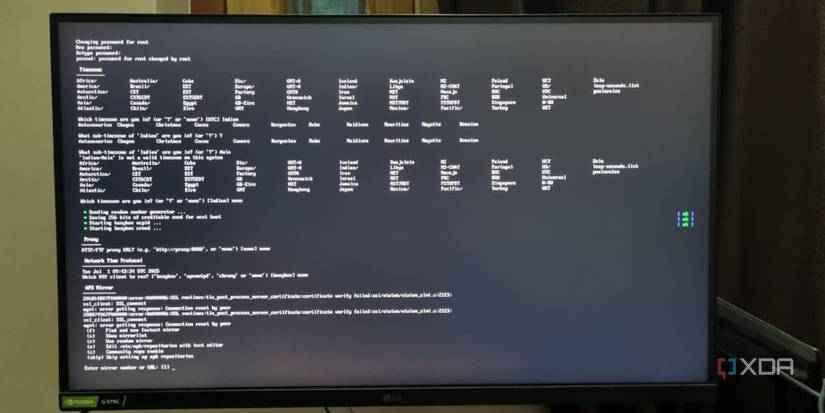
Alpine Linux is more like the official Raspberry Pi OS, but focuses on setup scripts more than Whiptail menus. So, you’ll see a lot of textual prompts with a response requirement rather than any interactive means to set up the OS. That said, it’s among the best lightweight operating system options for using the Pi as a remotely accessible server.
It’s certainly not for the average user just starting out and using a different package manager (APK). If you’re acquainted with the apt package manager, the installation commands aren’t that different, but remembering them takes a few repetitions.
The icing on the cake is obviously for DIY users who need an OS that can run without a disk. Alpine’s diskless mode saves everything to the RAM, and there’s even a hybrid mode (sys) that combines the disk save and RAM.
Raspberry Pi OS Lite
The default choice for many


Many Raspberry Pi distros use Debian as a base, including DietPi and the official Raspberry Pi OS and OS Lite. I tried using Debian, but honestly, setting up other distros on my list was far easier than setting up Debian images for Raspberry Pi. Even setting up simple stuff, such as Wi-Fi, needs a wpasupplicant file modification, and that’s a deal breaker for me.
The next best thing and probably the most comfortable option for a beginner is Raspberry Pi OS Lite. It’s based on Debian and doesn’t make the setup and access process too complex. For Wi-Fi-only models like the Raspberry Pi Zero 2W, it’s a perfect fit to run apps on top without worrying about excessive system resource usage.
You also get wide app compatibility and can install them from the apt repository or any repo of your choice. I haven’t had problems with setting up self-hosted apps on the Raspberry Pi OS Lite, and the community is always there to help. I do crave the ease of installation that Armbian offers, but you cannot get everything in every OS.
Still, managing device settings is possible via raspi-config, a feature missing in Alpine Linux. I can edit network, display, audio, and video, and don’t need to open a service or config file ever. If the Raspberry Pi OS Lite could add useful Whiptail menus for common actions like Armbian or DietPi, it would become the most beginner-friendly operating system ever.
No dearth of options
DietPi isn’t a bad OS, but if you want to venture outside, there are many options. I find Armbian a good alternative to DietPi in some areas, but the Raspberry Pi OS Lite is equally good. If you want something different from Linux, give RISC OS a go. It’s got a GUI interface which looks a bit dated, but it can run with the bare minimum of resources.
link